
How to Prepare Your Comic Book for Print: Bleed, Trim, and Safe Zones Explained
You've finished drawing your comic book. The pages are colored, the dialogue is lettered, and the cover looks fantastic. You're ready to turn your digital artwork into something readers can hold in their hands. But there's one more step between finished artwork and a professionally printed book: making sure the files are actually ready for production.
A comic that looks perfect on a computer screen can develop problems on paper. Word balloons may sit too close to a cut edge, background art may leave unintended white strips, and details may disappear into the binding. Fortunately, most of these problems are preventable. This guide explains trim sizes, bleed, safe zones, resolution, color, lettering, and print-ready PDF preparation for independent comic creators.
1. Start with the Finished Size of Your Comic
Before laying out your pages, decide how large the finished book will be. In printing terminology, this is the trim size: the dimensions of a page after it has been cut. Trim size is not necessarily the same as the size of the digital page you submit for printing.
Critical Blast Publishing supports several familiar comic-book and graphic-novel formats. For full-bleed interior pages, use the corresponding PDF sizes below:
| Format | Finished Trim Size | Full-Bleed Interior PDF Size |
|---|---|---|
| Standard American Comic | 6.625 × 10.25 in. | 6.75 × 10.50 in. |
| Graphic Novel | 7 × 10 in. | 7.125 × 10.25 in. |
| A4 International | 8.268 × 11.693 in. | 8.393 × 11.943 in. |
| Oversized Comic / Hardcover | 8.5 × 11 in. | 8.625 × 11.25 in. |
These dimensions are for interior pages, not complete covers. A4 values are rounded to three decimal places; use project-specific measurements when precision matters. A standard American comic has familiar proportions, while 7 × 10, A4, and 8.5 × 11 provide different presentation options. Choose your trim size before final page layout. Changing it later can mean resizing artwork, moving lettering, or redrawing panels.
2. What Is Bleed, and Why Does It Matter?
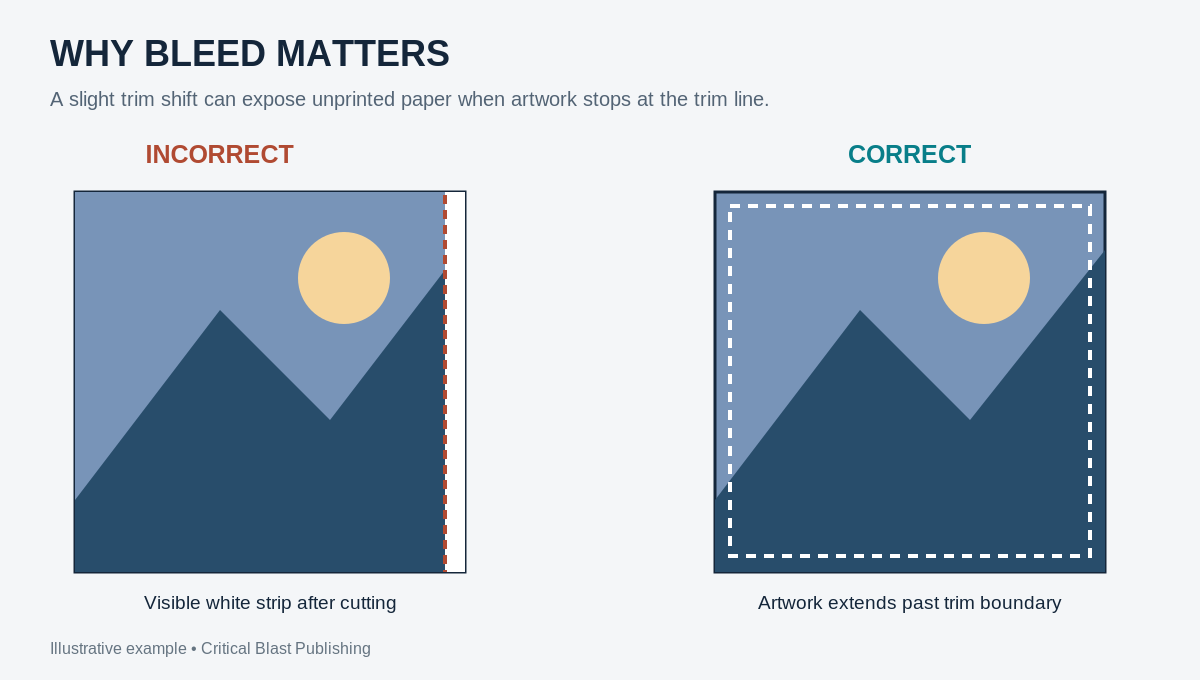
Imagine a splash page whose skyline reaches the very edge of the paper. If the artwork stops exactly at the intended cut line, even a tiny variation in trimming can expose a thin white strip. Bleed is extra artwork that extends beyond the finished page so minor cutting variations do not leave unprinted paper.
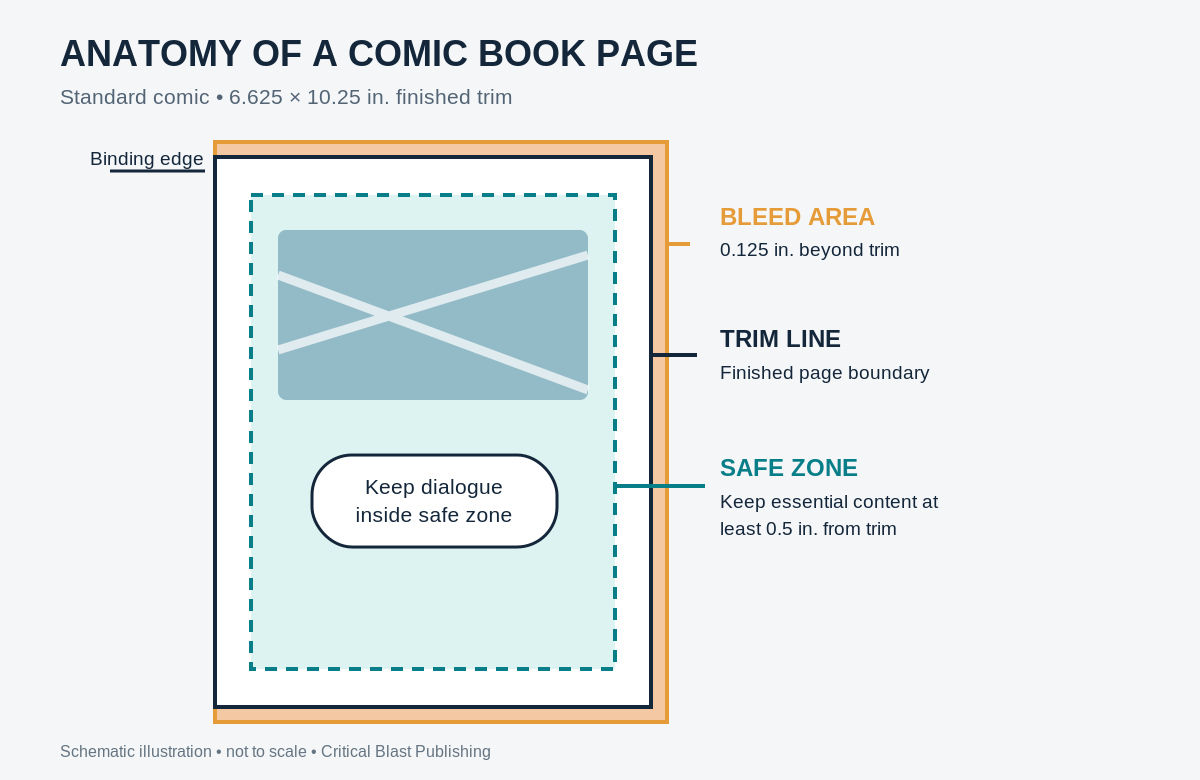
For Critical Blast Publishing’s standard full-bleed interior files, extend artwork 0.125 inches (one-eighth inch) beyond the top, bottom, and outside edge of each page. Do not add bleed to the inside edge at the binding. The outside edge is on the left for a left-hand page and on the right for a right-hand page.
This is why a 6.625 × 10.25-inch comic needs a 6.75 × 10.50-inch full-bleed interior PDF: one additional eighth-inch across the width, and an eighth-inch at both top and bottom.
Bleed is not simply enlarging your finished page
Enlarging a finished page to make it fit the bleed dimensions can push word balloons, panel borders, and important details too close to the cut. Instead, establish bleed when you create the layout, then extend backgrounds and other nonessential scenery beyond the trim line. The extra artwork is expected to be removed.
3. Understanding the Safe Zone
Bleed protects the edges; the safe zone protects what readers must be able to see. Critical Blast Publishing recommends positioning essential text and artwork at least 0.5 inches inside the finished trim edges. Keep dialogue, captions, page numbers, logos, and critical visual details within this area.
A balloon placed just inside the trim line might lose lettering during cutting. A caption close to the binding may become difficult to read without forcing the book open. A safe zone is a design guideline, not a visible border in the printed book.
Three zones on every full-bleed page
- Bleed area: Extra artwork outside the trim line, intended to be cut away.
- Trim line: The intended outer edge of the finished page.
- Safe zone: The interior area where essential lettering and artwork should stay.
4. Full-Bleed Pages Versus White-Bordered Pages
Not every page needs edge-to-edge art. A page of panels surrounded by intentional white borders can generally be designed at the exact trim size if the entire interior is being produced without bleed. A splash page that runs to the edge needs the larger full-bleed dimensions.
Many books contain both styles. When preparing an interior as a full-bleed PDF, keep every PDF page the same dimensions, including pages whose artwork has intentional white margins. A white border should be an artistic choice, not an accident caused by missing bleed.
5. Give the Binding Edge Room
The inside edge is different from the outside edge because pages meet at the spine. In thicker graphic novels and hardcovers, part of the inner page can be harder to see. Avoid placing important lettering, faces, or plot-critical details near the gutter. Some projects need more inside clearance than the general half-inch recommendation, depending on page count and binding.
What about double-page spreads?
A double-page illustration may appear continuous on screen, but the binding interrupts the center. Avoid positioning small lettering, faces, or other critical elements directly across that join. Even if you create the art as one wide composition, the final interior PDF should contain individual pages in reading order, not combined two-page spreads.
6. Image Resolution: Why 300 PPI Matters
The amount of image detail matters just as much as its physical dimensions. For continuous-tone color artwork, aim for 300 pixels per inch (PPI) at final print size. People often call this “300 DPI,” though pixels per inch and printer dots per inch are technically different measurements.
A small image can look excellent on a monitor but become blurry when enlarged for print. Increasing the resolution setting after the fact does not restore missing detail. Prepare or scan source artwork at a suitable resolution from the start.
| Format | Pixel Dimensions |
|---|---|
| Standard American Comic | 2,025 × 3,150 |
| 7 × 10 Graphic Novel | 2,138 × 3,075 |
| A4 International | 2,518 × 3,583 |
| 8.5 × 11 Hardcover | 2,588 × 3,375 |
Pixel counts are approximate and rounded to whole pixels. Detailed one-bit black-and-white line art may benefit from higher-resolution source files. Keep lettering and vector artwork as vectors where practical so edges remain crisp.
7. RGB, CMYK, and Color in Print
Screens use RGB light; conventional full-color printing uses CMYK inks. Some bright blues, greens, and luminous effects visible on a screen cannot be reproduced with identical intensity on paper. For Critical Blast Publishing’s standard color-print workflow, prepare final color files in the specified CMYK color space. Confirm the requirements for your particular project before conversion.
Check saturated colors, subtle contrast, and dark areas before export. For black-and-white interiors, prepare the appropriate grayscale or monochrome artwork rather than relying on an uncontrolled conversion. A physical proof is the best way to assess how paper, ink, and lighting affect the result.
8. Lettering, Fonts, and Readability
Comic lettering must be legible at the finished size, not merely when zoomed in on a monitor. This matters when shrinking a large-format page into a smaller comic-book edition. Thin decorative type, tiny captions, and low-contrast lettering may become difficult to read.
Preserve lettering as embedded fonts or vector shapes when practical, and make sure all fonts in the exported PDF are embedded. Check the actual PDF for substitutions, spacing changes, and word balloons that have shifted too close to the edge. Readers should never have to bend a book backward to decipher dialogue.
9. Preparing Your Interior PDF
Supply the interior as one PDF containing individual pages in the correct reading order. A 64-page book should have 64 PDF pages, not 32 combined spreads. Include front matter, credits, story pages, and intentional blank pages in the proper sequence.
Check that page sizes are consistent, images have sufficient resolution, colors match the intended production workflow, and fonts are embedded. Do not include visible crop marks or registration marks in the final interior PDF. Open the exported file and inspect every page; do not rely solely on the source layout file.
10. Your Cover Is a Separate Project
The interior and cover are separate production files. A complete cover typically includes the back, spine, and front as a continuous design. The correct spine width depends on the final page count, paper selection, and binding. A 64-page comic and a 300-page graphic novel cannot use the same spine calculation simply because they share a trim size.
Paperback covers typically use 0.125 inches of outer bleed. Case-laminate hardcovers require a larger wrap allowance—commonly 0.625 inches—and have additional board and hinge considerations. Never guess final cover dimensions. Critical Blast Publishing supplies project-specific cover specifications after the format, page count, paper, and binding have been confirmed.
11. Common Mistakes That Delay Production
- Wrong page size: The PDF does not match the selected trim and bleed specifications.
- Missing bleed: Edge-to-edge backgrounds stop at the trim line.
- Unsafe lettering: Dialogue or captions sit too close to the cut or gutter.
- Low-resolution art: Images look sharp on screen but print soft or pixelated.
- Unprepared colors: Bright or dark colors reproduce unexpectedly.
- Missing fonts: Lettering is substituted or shifts during export.
- Combined spreads: Two facing pages are exported as one wide PDF page.
- Incorrect cover setup: Spine or wrap dimensions were guessed.
- Printer marks: Crop or registration marks remain visible in the final file.
Most of these problems can be caught before submission. Reviewing your exported PDF is far less expensive than discovering a mistake after a proof has been printed.
12. Print-Preparation Checklist
Page setup
- Confirm the finished trim size before final layout.
- Use the correct full-bleed interior PDF dimensions when required.
- Extend edge-to-edge art 0.125 inches beyond the top, bottom, and outside edges.
- Do not add interior bleed at the binding edge.
- Keep essential lettering and art within safe margins.
Artwork and lettering
- Prepare continuous-tone artwork at approximately 300 PPI at final size.
- Check grayscale, monochrome, or CMYK preparation for the chosen production process.
- Review lettering at actual print size and embed all fonts.
- Account for the binding when designing double-page spreads.
Files and cover
- Export individual interior pages in reading order as one PDF.
- Keep page dimensions consistent and remove crop/registration marks.
- Inspect every page of the exported PDF.
- Confirm final page count, paper, and binding before requesting cover dimensions.
- Export the finished cover separately using the supplied project specifications.
13. From Finished Artwork to a Finished Book
Preparing a comic for print may feel intimidating at first, but the principles are straightforward. Trim determines the finished size; bleed protects edge-to-edge art; safe zones protect essential content; and careful resolution, color, and PDF preparation help the printed book match your intentions.
Critical Blast Publishing works with independent creators to bring books into print and make them available through global distribution channels. Our creator-owned model means you retain 100% ownership of your intellectual property while we provide publishing and distribution services.
Ready to bring your comic book into print? Visit Critical Blast Publishing to learn more about our publishing program and how we can help turn finished artwork into a professionally published book.